Stock Check
The books and the shelf drift apart eventually: a box handed over without being recorded, a broken blister never written off. A stock check is where you count for real, put that number into the software, and say why it differs.

Illustration of the Stock take screen
| Area | What it is |
|---|---|
| 1. Stock check | Create a new check. |
| 2. Import | Load the counted figures from a file — useful for a store with many items. |
| 3. Search, Check date, Status | Find and filter the checks already made. |
| 4. Clear and refresh | Drop the filters and reload. |
The table holds the Stock check code, Difference, Status, Check date, Note, Approval info and Creation info — who counted and who approved are both on record.
Creating a stock check
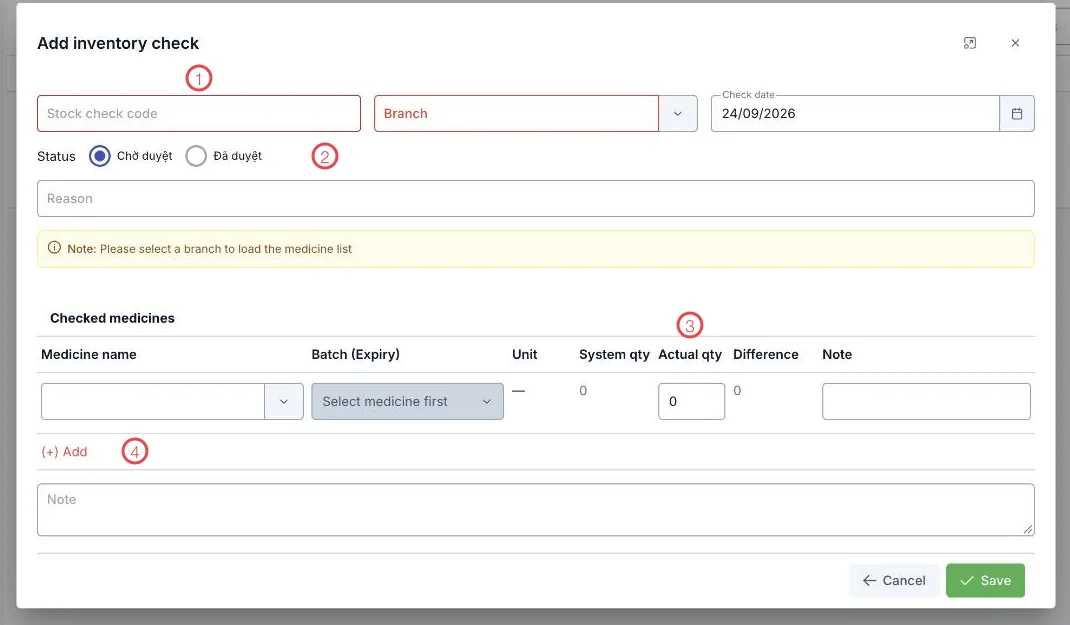
Illustration of the stock check form
| Area | What to enter |
|---|---|
| 1. The top row | Stock check code, Branch (required) and Check date. The medicine list only loads once a branch is chosen. |
| 2. Status | Pending approval to have someone review it, or Approved if you can sign it off yourself. |
| 3. Actual qty and Difference | Type what you counted; System qty and Difference are filled and calculated for you. |
| 4. (+) Add | Add the next medicine line to the check. |
There is also a Reason field at the top and a Note at the bottom — worth saying why the check happened (month end, spot check, or after a discrepancy was spotted).
Each line picks a medicine and then a batch (expiry) — counting down to the batch, so you know exactly which batch is over or short.
Check statuses
| Status | Meaning |
|---|---|
| Pending approval | Counted and recorded, waiting for approval. |
| Approved | The result is final. |
| Cancelled | Dropped. |
A stock check states how far off reality is. To bring stock back into line, create a stock issue of type Adjustment for the difference — that fixes the figure and leaves a record of why.
Related
- Inventory — the software's figures, for comparison.
- Stock Export — where a difference gets settled.
- Batch / Expiry — counting down to the batch.