Inventory
This is the quickest answer to "do we still have this?". Each row is one medicine, with what is on hand and — more to the point — how much of it is still usable.
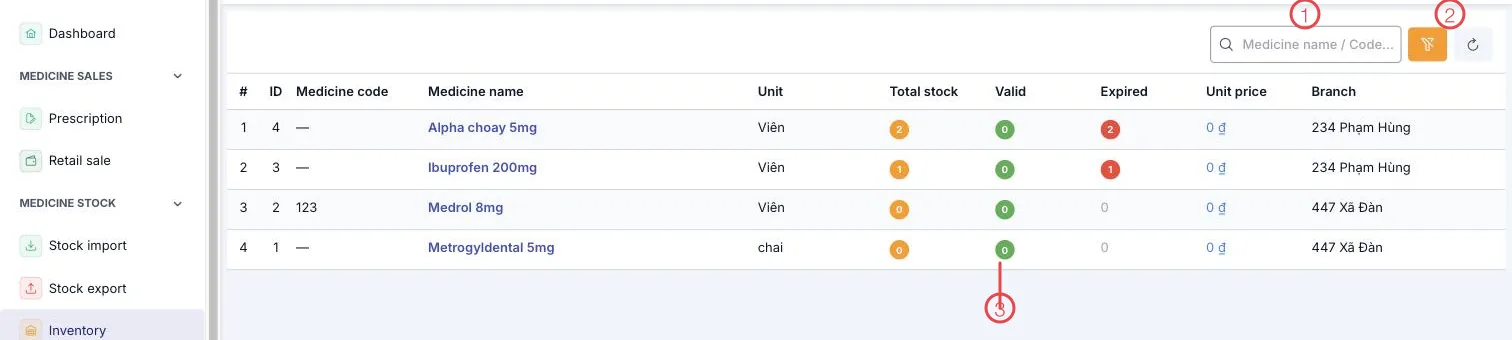
Illustration of the Stock balance screen
| Area | What it is |
|---|---|
| 1. Search box | Search by medicine name or code. |
| 2. Clear and refresh | Drop the current filters and reload the figures. |
| 3. The three quantity columns | Total stock · Valid · Expired — see below. |
The other columns: Medicine code, Medicine name, Unit (tablet, bottle…), Unit price and the Branch holding it.
Three figures to read together
| Column | Meaning |
|---|---|
| Total stock | Everything sitting in the store. |
| Valid | The part you can actually dispense and sell. |
| Expired | The part past its expiry date, waiting to be disposed of. |
Worth remembering: a large total does not mean you can sell it. An item showing Total 2 · Valid 0 · Expired 2 means the shelf has stock but none of it is usable — time to reorder and to dispose of what has expired.
Read it branch by branch
Each branch holds its own store, so the same medicine can be in stock in one place and out in another. The Branch column says where the goods are — short in one place is often a transfer rather than a new order.
Related
- Batch / Expiry — the same stock broken down by batch and expiry.
- Stock Check — comparing these figures with a physical count.
- Stock Import — where stock is added.