Internal Chat Overview
Where does today's clinic conversation actually live? Part of it in the morning shift's Zalo group, part in a private message between a doctor and reception, part in the phone of the assistant who left last month. When someone needs to find "who approved the discount for Ms Lan", nobody can open it any more.
Internal Chat brings all of that into the software, right beside the record it is about. Staff still chat the way they always did — direct messages, small groups, channels — the only difference is that it stays with the clinic.
The module is for every member of staff; no special permission to request.
Getting in
After you sign in, click the Internal chat tile on the module screen.
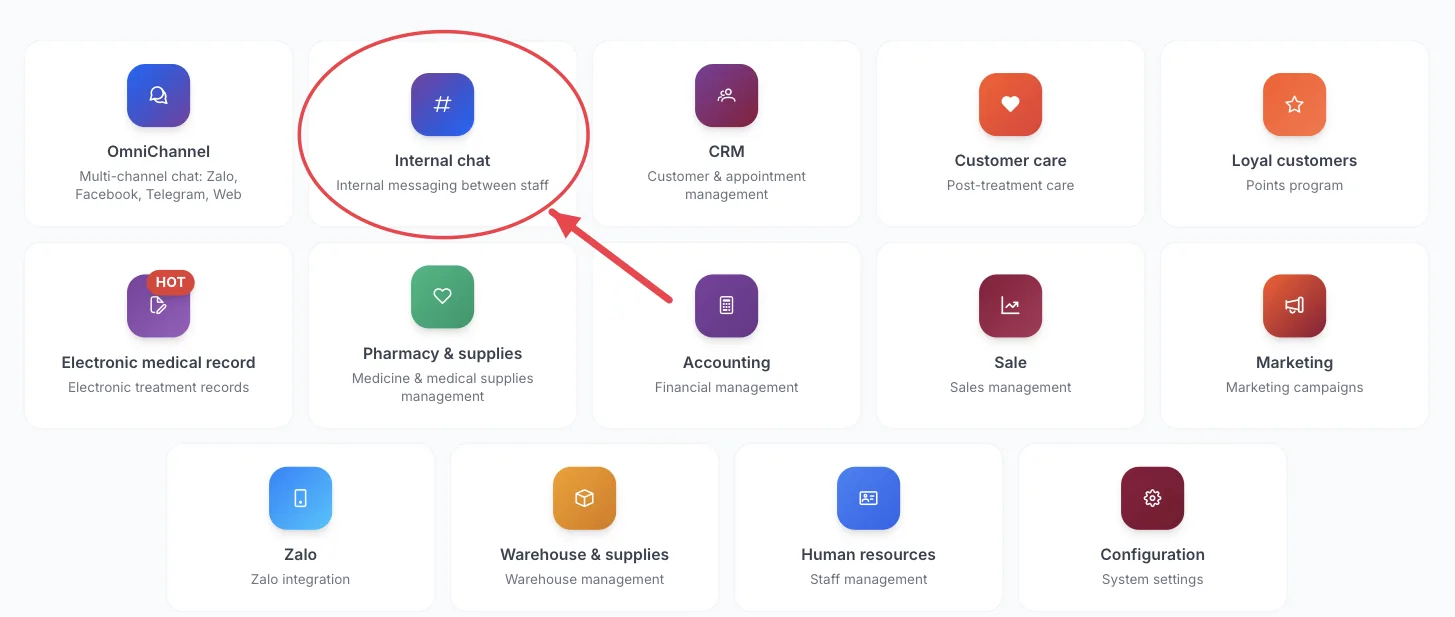
Illustration of the Internal chat tile on the module screen
You don't have to leave what you are doing: the Internal chat button in the top bar opens a chat bubble in the corner — answer, close it, and you are back exactly where you were.
What the screen holds
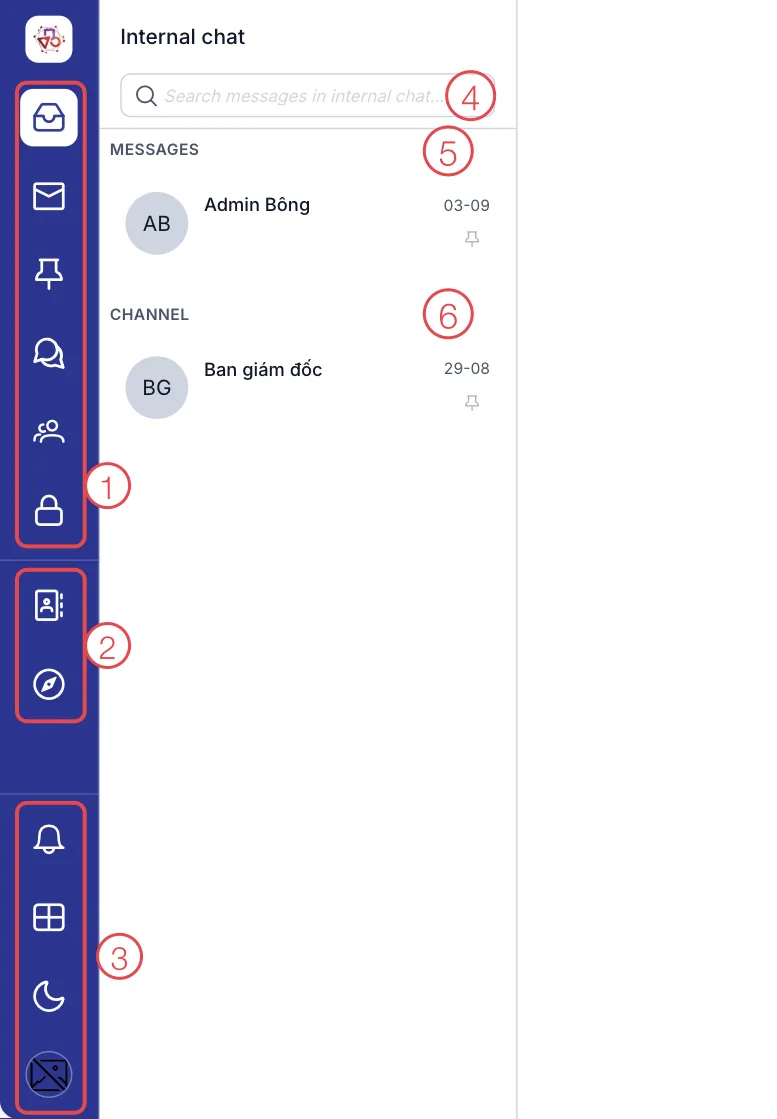
Illustration of the Internal chat screen
| Area | What it is |
|---|---|
| 1. Conversation filters | All, Unread, Pinned, Messages, Channels, Record discussions. Each carries its own unread count. |
| 2. Directory and Discover channels | Find a colleague to message, and browse public channels you can join yourself. |
| 3. Shared tools | The notification bell, System modules to switch module, the dark mode button, and your account. |
| 4. Search | Find an old message across every internal conversation. |
| 5. MESSAGES | Direct messages and small groups. |
| 6. CHANNELS | The channels you belong to. Click a row to open it on the right. |
Three kinds of conversation
| Kind | Use it when |
|---|---|
| Messages | One-to-one, or a small unnamed group of 2–7 people for one short job. |
| Channels | Named, larger, long-lived: Reception, Clinic 1, Weekend shift. A public channel is visible to everyone in the company and anyone can join. |
| Record discussions | About exactly one record — a customer, an order, a medical record. Opened from the record itself, and the customer cannot read a word of it. |
What the module gives you
Clinic work stays with the clinic
Discussion about a patient lives in the clinic's system, not in someone's personal phone. When a member of staff leaves, the history is still there and whoever takes over can read back instead of asking from scratch.
The discussion sits on the record
This is the real difference from an ordinary group chat. Open a customer's record, click Internal discussion, and there is exactly what the team said about that case: what the doctor asked for, whether the discount was approved, what the customer complained about last time. No scrolling back through a shared group to find it.
The other way round, while chatting you can attach a customer record to a message — one click opens it for everyone, instead of reading phone numbers out to each other.
Channels that follow your org chart
Organisation channels are built by the system from your structure: join a department and its channel is simply there, move on and you are out of it. Nobody has to remember to add the new hire, and nobody who changed jobs keeps reading their old team's messages.
Reach the right people without pestering everyone
Mentions with @ suggest names as you type, plus All and Online now. Before a mention notifies a crowd, the software asks you to confirm — so the channel never becomes the place where everyone mutes notifications.
Findable later
Search messages by keyword, filter by sender, and search the whole history when you need to. Something agreed three months ago can still be pulled up.
Busy means busy
Set your status to Busy and new customer conversations stop being assigned to you automatically — a doctor mid-procedure or a receptionist handling a difficult customer (patient) does not get more work pushed at them.
No second app to keep open
The chat bubble floats over whatever screen you are on, and its notifications arrive in the same bell as the rest of the software. Nobody hops between the ERP and a chat app, so work messages never get mixed in with personal ones.
Agree it across the clinic: anything about a patient goes through Internal Chat. Keep that one rule and in three months you have a searchable record instead of a dozen chat groups nobody can reopen.
What's in this module
Getting started
| Page | What it covers |
|---|---|
| The Internal Chat screen | The chat bubble and the full screen. |
| Setting your status | Online, Busy, Offline — and what Busy does to work assignment. |
Lists
| Page | What it covers |
|---|---|
| Conversation filters | The six filters on the left, and pinning conversations. |
| Direct messages and groups | One-to-one chats and small groups. |
| Chat channels | Synced department channels, your own, and public ones. |
| Internal discussion on a record | A channel attached to a customer record. |
| Staff directory | Find colleagues, start groups, discover channels. |
Actions
| Page | What it covers |
|---|---|
| Sending a message | The composer, files and images. |
| Mentioning a colleague | @all, @here and reaching the right person. |
| Attaching a customer to a message | Drop a record in so everyone opens the right one. |
| Message actions | Reply, edit, pin, delete. |
| Searching messages | By conversation, by sender, whole history. |
Related
- Internal chat module — the short introduction in Getting started.
- First Login — getting in and the module screen.