Mentioning a Colleague
In a busy channel messages scroll away fast. Type @ to call somebody by name — they get their own notification instead of hoping they scroll back.
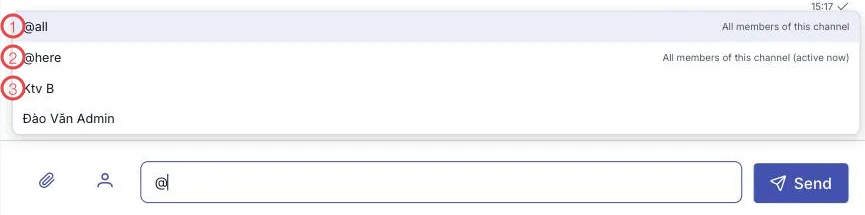
Illustration of the mention suggestions
| Option | Who it notifies |
|---|---|
| 1. @all | Every member of the channel. |
| 2. @here | Every member currently active — right for something that must be handled this shift. |
| 3. The member list | Type a few letters to filter, then pick the person you actually want. |
Three things worth knowing
Pick the name from the list. Typing @Lan by hand and sending is just text — nobody is
notified. The software warns you when it spots that.
Notifying a crowd asks for confirmation. Before a mention reaches a whole group, the software asks "notify how many people?" — you confirm, then it sends.
Mention well and the channel stays alive. A channel where everything is @all is a channel everyone mutes within a week. Use @here for this-shift work, and name the individual for one person's job.
@here notifies only whoever is online. The night shift and people on their day off are not
woken by a morning-shift job — while the job still reaches whoever is actually on duty.
Related
- Sending a message — the composer.
- Chat channels — where mentions matter most.