Direct Messages and Groups
Messages holds one-to-one conversations and the small groups you throw together for one short job: swapping a shift, checking a detail, agreeing something before answering a customer.
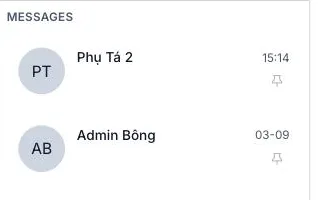
Illustration of the Messages list
Each row carries the person's or group's name, the time of the last message and a pin icon. Click the row to open it.
Inside a conversation
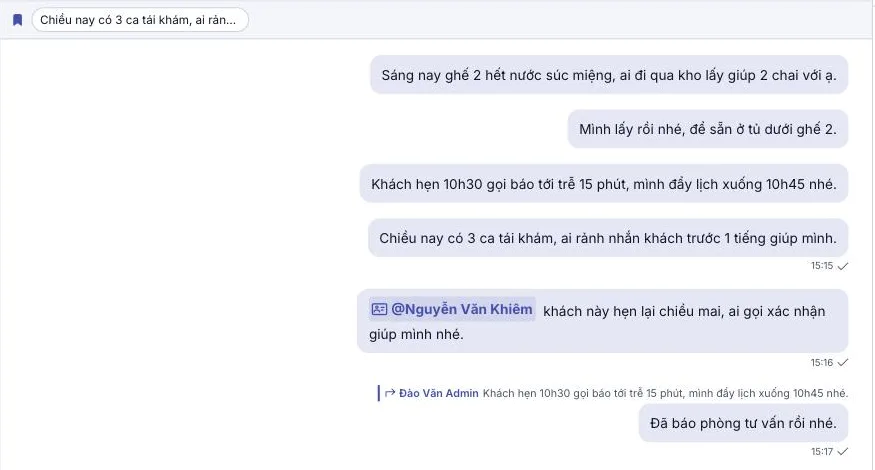
Illustration of an open conversation
- Your own messages sit on the right with the time and a tick confirming delivery.
- A message replying to an older one carries a quote of the original above it.
- The right-hand panel lists the conversation's members with each one's status dot.
Starting a direct message
Open the Directory, find your colleague and click — the conversation opens straight away, no friend request, no approval. Pulling in more people to make a small group starts in the Directory too.
A small group suits a short job, 2–7 people, no name needed. Anything longer-lived with more people belongs in a channel — named, easy to find again, and newcomers can read the whole story.
Related
- Staff Directory — where direct messages and groups start.
- Sending a message — the composer and its buttons.
- Message actions — reply, edit, pin, delete.